
Nightstand with Outlet and USB: The Ultimate Buying Guide
Transform your bedside into a smart, organized charging hub. Learn how to choose the perfect nightstand with built-in power outlets and USB ports for your modern bedroom.
START EXPLORINGWhy a Nightstand with Outlet and USB is a Game-Changer
In today's connected world, our bedrooms have become more than just a place to sleep. They are sanctuaries for relaxation, workspaces for remote professionals, and entertainment hubs. With the average person charging multiple devices daily—smartphones, tablets, smartwatches, e-readers, and laptops—the traditional bedside table with a single power outlet simply doesn't cut it anymore.
A nightstand with outlet and USB solves this modern dilemma by integrating charging capabilities directly into your furniture. Instead of fumbling for wall adapters or creating a tangled mess of cords, you get a streamlined, convenient solution that keeps your devices powered and your bedside clutter-free. This guide will walk you through everything you need to know to make an informed purchase.
Quick Tip: Before you buy, measure the height of your mattress. The ideal nightstand should be level with or slightly lower than your mattress top for comfortable reach and visual balance. For more details, see our nightstand placement guide.
Key Features to Look For in a Charging Nightstand
Not all charging nightstands are created equal. Understanding the technical specifications and design features will help you choose a model that meets your specific needs and lasts for years.
🔌 Outlet Types & Power
Look for standard AC outlets that can handle at least 15 amps. Some models include USB-A ports, while newer designs offer USB-C with Power Delivery (PD) for fast charging. Consider how many devices you need to charge simultaneously.
⚡ USB Port Configuration
USB-A ports are still common, but USB-C is becoming the standard. A mix of both is ideal. Check the power output—standard USB ports deliver 2.4A, while fast-charging ports can deliver up to 20W or more.
📍 Port Placement
Ports can be located on the top surface, the front face, or even on the side. Top-mounted ports are easiest to access, while front-facing ports keep cords tidy. Consider your bedtime routine when choosing placement.
🛡️ Safety Features
Look for built-in surge protection, overload protection, and children's safety outlets. These features protect your expensive electronics and give you peace of mind.
📏 Size & Storage
Balance your need for charging ports with storage space. Drawers and shelves provide room for books, glasses, and other bedside essentials. Consider a nightstand with lots of storage if organization is a priority.
🎨 Style & Material
Charging nightstands come in all styles—from sleek modern designs to rustic wood finishes. Choose a material that complements your bedroom decor. If you prefer a classic look, a solid wood one-drawer nightstand with added charging ports is a great option.
Types of Nightstands with Outlets and USB
There are several types of charging nightstands on the market, each with its own advantages. Here's a breakdown to help you decide which is right for you.
1. Built-in Charging Station
These nightstands have the charging ports integrated directly into the furniture's design. The wiring is hidden, and the ports are typically located on the top or front face. This is the cleanest, most permanent solution. If you want a dedicated charging station, you might also consider a charging station for night stand as an add-on.
Pros
- Seamless, integrated look
- No visible cords or adapters
- Often includes surge protection
Cons
- Higher upfront cost
- Less flexibility if ports become outdated
2. Removable Power Strip Module
Some nightstands come with a removable power strip that can be mounted or placed inside a drawer. This offers more flexibility—you can replace the power strip if it fails or if you need different port configurations.
Pros
- Replaceable and upgradeable
- Can be used separately
- Often more affordable
Cons
- May shift or move around
- Less integrated appearance
3. Wireless Charging Surface
Some high-tech nightstands feature a built-in wireless charging pad on the top surface. Simply place your compatible phone on the designated spot to charge. These often also include traditional USB and AC ports for other devices.
Pros
- Ultimate convenience—no cables needed
- Modern, futuristic aesthetic
Cons
- Slower charging than wired options
- Requires compatible phone case
- Premium price point
How to Choose the Right Nightstand with Outlet and USB
With so many options available, narrowing down your choice can feel overwhelming. Follow this step-by-step framework to make the right decision for your bedroom.
- Assess Your Device Charging Needs: Count how many devices you typically charge at night. Do you need two USB ports or four? Do you need fast charging for a tablet or laptop? Make a list before you shop.
- Measure Your Space: Nightstands come in a wide range of sizes. For small bedrooms, consider a narrow accent table with drawers or a slim bedside table with drawers. If space is tight, a nightstand under 12 inches wide might be your best bet.
- Determine Your Style: Your nightstand should complement your bedroom's aesthetic. Are you drawn to modern minimalism, rustic charm, or mid-century elegance? For a retro vibe, check out mid-century nightstands for sale.
- Set a Budget: Charging nightstands range from affordable to luxury. Entry-level models with basic USB ports start around $80, while premium models with wireless charging and solid wood construction can exceed $500. A reasonable mid-range budget is $150–$350.
- Check Safety Certifications: Ensure the electrical components are UL-listed or ETL-certified. This is non-negotiable for safety.
- Read Reviews: Look for reviews that specifically mention the charging functionality. Do the ports work well? Is the placement convenient? Are there any issues with durability?
Installation and Setup Tips
Once you've purchased your nightstand with outlet and USB, proper setup is key to maximizing its convenience and safety.
- Position Near an Existing Outlet: Most charging nightstands have a single power cord that plugs into a wall outlet. Ensure your desired location is within reach of a wall outlet, or use a high-quality extension cord.
- Manage Cords: Use cable management clips or ties to keep cords organized and out of sight. Many nightstands have a designated cord management hole or channel.
- Test All Ports: Before placing items on the nightstand, plug in a device to each port to ensure they are functioning correctly.
- Consider Surge Protection: If your nightstand doesn't have built-in surge protection, plug it into a surge protector to safeguard your devices.
- Style Your Nightstand: Once set up, style your nightstand with a lamp, a book, and a small plant. For inspiration, see our bedside vignette ideas.
Comparison: Popular Nightstand Charging Configurations
| Feature | Basic USB Nightstand | USB-C Fast Charging | Wireless Charging |
|---|---|---|---|
| Typical Price Range | $80–$200 | $150–$350 | $250–$600+ |
| Charging Speed | Standard (2.4A) | Fast (up to 20W+) | Moderate (7.5W–15W) |
| Device Compatibility | All USB devices | Modern smartphones, tablets | Qi-enabled devices only |
| Convenience | Good | Excellent | Best (no cables) |
| Future-Proofing | Limited | High | High |
Safety Considerations for Charging Nightstands
When you're integrating electrical components into your bedroom furniture, safety should always be the top priority. Here are essential safety tips to keep in mind:
- Look for UL or ETL Certification: These certifications indicate that the product has been tested and meets safety standards.
- Avoid Overloading: Don't plug too many high-wattage devices into a single nightstand. Check the maximum wattage rating.
- Keep Away from Water: Ensure your nightstand is not placed near a humidifier, water carafe, or any source of moisture. If you like to keep water nearby, use a bedside water carafe with tray to contain spills.
- Check Cords Regularly: Inspect power cords for fraying or damage. Replace immediately if any issues are found.
- Use Surge Protectors: Even if your nightstand has built-in protection, an additional surge protector can provide an extra layer of security.
Styling Your Nightstand with Outlet and USB
A charging nightstand doesn't have to look utilitarian. With a little creativity, you can style it to be both functional and beautiful.
- Choose the Right Lamp: A wall-mounted bedside table lamp can free up surface space. Alternatively, a bedside lamp with USB charger combines lighting and charging in one sleek unit.
- Add a Catchall Tray: A small tray keeps jewelry, glasses, and keys organized. See our bedside catchall trays guide for ideas.
- Incorporate Greenery: A small succulent or air plant adds life and color to your bedside.
- Layer Textiles: A small runner or placemat under your lamp and tray adds texture and warmth.
- Keep It Clutter-Free: The whole point of a charging nightstand is to reduce clutter. Be intentional about what you keep on top.
Recommended Nightstands with Outlet and USB
⚠️ AFFILIATE DISCLOSURE: This website contains affiliate links. As an affiliate Associate, we earn from qualifying purchases. If you make a purchase through these links, we may receive a small commission at no additional cost to you. Read our full affiliate policy.

Lazzanto Nightstand with Rear Charging Station, LED Light, 2 Drawers, Black | Industrial Nightstand, 2 USB-A Ports & AC Outlets, Raised Back Guard, Fabric Storage Drawers, Bedside Table for Bedroom, Dorm
Check price on Amazon
Yoobure Nightstand with Charging Station, Small Night Stand with Fabric Drawers and Storage Shelf for Bedrooms, Small Spaces, Bedside Table with USB Ports & Outlets
Check price on Amazon
Furologee Nightstand Set of 2 with LED Lights, Charging Station, Black Oak | Night Stand Set 2 with USB & Outlets, Side Table with Storage, Industrial End Table, for Living Room/Bedroom, Dorm
Check price on Amazon
Furologee Night Stand with Charging Station, 2 Fabric Drawers, White | Night Stand with USB & Outlets, Side Table with Storage & Hooks, Industrial End Table for Living Room/Bedroom
Check price on Amazon
OLIXIS Nightstand with Charging Station, Beside Table with Fabric Drawer | 3-Tier End Table with 2 Storage Shelves,Night Stand with USB Ports and Outlets for Bedroom, Black and Rust
Check price on Amazon
LEYAOYAO 31.5" Wide Rattan Night Stand Set 2 Charger Station | Large Nightstand, Boho Bed Side End Tables with 2 Drawers, Walnut Tall Bedside Table for Bedroom Living Room, Hallway
Check price on Amazon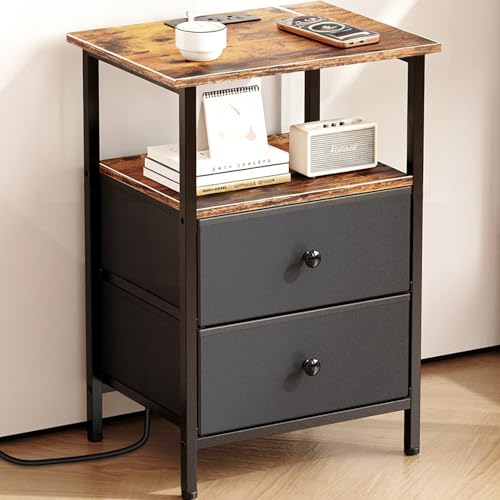
Smoproper Nightstand with Charging Station, Bedside End Table with 2 Fabric Drawers for Bedroom, Side Table with USB Ports and Outlets (Brown Black)
Check price on Amazon
Furnulem Night Stand with Charging Station, 3 Fabric Drawers Bedside Table | Rustic Brown Dorm Nightstand For Bedroom, 28.3 Inch Tall, Usb Ports & Outlets, Side Table with Storage Shelf, 3 Ways to Use
Check price on AmazonFinal Thoughts: Invest in a Smarter Bedside
A nightstand with outlet and USB is more than just a piece of furniture—it's a lifestyle upgrade. It simplifies your daily routine, reduces clutter, and ensures your devices are always ready when you are. By considering your charging needs, available space, and personal style, you can find the perfect nightstand that enhances both the functionality and aesthetics of your bedroom.
Whether you opt for a simple USB-equipped model or a high-tech wireless charging station, the convenience of having power at your fingertips is undeniable. Take your time, do your research, and choose a nightstand that will serve you well for years to come.
Ready to explore more? Check out our guide to nightstands with power and USB for even more options, or browse our charging nightstand set of 2 if you're furnishing a master bedroom.