
Beside Table Cable Management: The Complete Clutter-Free Guide
Transform your bedside table from a tangled mess of cords into a clean, organized, and safe charging station. Expert strategies for every type of nightstand.
Explore SolutionsWhy cable management matters at your bedside: A typical bedside table hosts phone chargers, lamp cords, smartwatch cables, tablet chargers, and sometimes CPAP machines or white noise devices. Without proper management, these cords become a tangled hazard that collects dust, causes tripping risks, and makes your bedroom look chaotic. This guide shows you exactly how to fix it.
Why Beside Table Cable Management Is Worth Your Time
The average person charges 3 to 5 devices at their bedside every night. Without a system, those cables wrap around lamp bases, fall behind the table, and create a fire hazard from overheating. Proper beside table cable management solves three problems at once: it improves safety, protects your devices from damage, and creates the calm, uncluttered sleeping environment your brain needs to relax.
If you're still deciding on the right furniture piece for your setup, understanding how different designs handle cord routing will save you headaches later. A nightstand with storage typically offers better cable concealment options than open designs, while a thin bedside table demands more creative solutions due to limited space.
Common Bedside Cable Problems (And Their Fixes)
Problem 1: The Tangled Web Behind the Table
Cords from lamps, chargers, and power strips intertwine into a knot that's impossible to untangle when you need to move furniture. This is the most common complaint among homeowners.
Fix: Bundle cables with Velcro straps or spiral wrap, then route them along the back edge of the table using adhesive clips. A cable management box placed underneath hides the power strip and excess cord length.
Problem 2: Charging Cables Falling Behind the Table
You plug in your phone, and the cable slips behind the nightstand within minutes. This happens because the cable is too short or lacks a retention point.
Fix: Use magnetic cable holders or weighted cable drops attached to the tabletop edge. A night stand with power strips built into the surface eliminates this problem entirely.
Problem 3: Too Many Devices, Not Enough Outlets
Between your phone, watch, tablet, and lamp, you quickly run out of wall outlets. Daisy-chaining power strips creates a messy, unsafe situation.
Fix: Install a single high-quality surge protector with 6+ outlets and USB ports, then mount it under the table. A charging station for night stand consolidates all charging into one organized hub.
Problem 4: Cords Visible Through Open Nightstand Designs
Open-shelf and floating nightstands expose every cable, ruining the minimalist aesthetic.
Fix: Use wall-mounted cable raceways painted to match your wall color. For floating designs, drill a small hole behind the table and run cables through the wall to an outlet below. A small floating nightstand with drawer offers a hidden compartment for cable routing.
7 Proven Beside Table Cable Management Solutions
1. Under-Table Cable Management Box
The workhorse solution. A fire-resistant box mounts under your nightstand and holds the power strip, excess cable, and adapters. Keeps everything hidden and dust-free.
$15–$402. Adhesive Cable Clips & Channels
Stick-on clips route individual cables along the table's back edge or leg. Paintable cord channels blend into any surface for a seamless look.
$8–$253. Magnetic Cable Holders
Magnetic clips attach to your tabletop or wall, keeping charging cables exactly where you need them. No more fishing behind the table at night.
$10–$204. Cable Sleeves & Spiral Wrap
Bundle multiple cords into a single neat tube. Ideal for lamp cords, clock cables, and device chargers running to the same outlet.
$7–$185. Wall-Mounted Raceways
For floating nightstands or wall-mounted tables, raceways conceal cables running from the table to the floor outlet. Paintable to match walls.
$12–$306. Retractable Cable Organizers
Spring-loaded reels keep charging cables at the perfect length. Pull out to use, retract when done. Perfect for phone and tablet charging.
$15–$357. Smart Power Strips with USB
Modern power strips include USB-C and USB-A ports, surge protection, and sometimes Wi-Fi control. Mount under the table for instant organization.
$25–$60Solution Comparison: Which Is Right for Your Setup?
| Solution | Best For | Installation | Cost | Cord Visibility |
|---|---|---|---|---|
| Under-Table Box | Closed nightstands with drawers | Easy (adhesive or screw) | $15–$40 | Fully hidden |
| Cable Clips & Channels | Any nightstand type | Very easy (peel & stick) | $8–$25 | Minimal |
| Magnetic Holders | Daily charging cables | Very easy | $10–$20 | Visible but tidy |
| Cable Sleeves | Multiple cords to one outlet | Easy | $7–$18 | Bundled |
| Wall Raceways | Floating nightstands | Moderate (adhesive or screw) | $12–$30 | Fully hidden |
| Retractable Organizers | Phone & tablet charging | Easy | $15–$35 | Minimal |
| Smart Power Strips | High-device households | Easy (mounting bracket) | $25–$60 | Hidden under table |
💡 Pro Tip: Combine two or three solutions for the best results. For example, use an under-table box for the power strip, magnetic holders for daily charging cables, and a cable sleeve for the lamp cord. This layered approach handles every cable type.
Step-by-Step: How to Set Up Beside Table Cable Management
- Clear everything off your nightstand. Remove the lamp, devices, and any decor. This gives you a clean workspace to assess the cable situation.
- Identify all cables and their destinations. Group them by type: lamp cord, phone charger, watch charger, tablet cable, etc. Note which devices stay plugged in permanently versus those that charge occasionally.
- Choose your power source location. Decide whether your power strip goes under the table, behind it, or inside a drawer. Under-table mounting is the most popular for accessibility and concealment.
- Install your cable management hardware. Mount the under-table box, attach adhesive clips, or install wall raceways. Measure twice before sticking anything down.
- Route cables from device to power source. Start with the lamp cord (usually the longest), then work through charging cables. Use clips or channels every 6 to 8 inches to prevent sagging.
- Bundle excess cable length. Coil extra cord inside the management box or secure it with Velcro straps. Never coil cables tightly around themselves — this generates heat.
- Test all connections. Plug in every device and verify charging works. Check that no cables are pinched or strained.
- Label your cables (optional but recommended). Use small labels or colored clips to identify each cable. Future you will thank present you when you need to swap a device.
Matching Cable Management to Your Nightstand Style
For Nightstands with Drawers
Drawer-equipped nightstands offer the best concealment options. You can drill a small hole in the back panel (check that it's not visible when the drawer is closed) and route all cables into the drawer itself. Place the power strip inside the drawer, and only the charging cables you're actively using need to exit. A nightstand with drawers with a dedicated cable port makes this even easier. The white nightstand with drawer and shelf style often includes a back cutout specifically for cord routing.
For Open-Shelf Nightstands
Open designs require more creative thinking since there's nowhere to hide. Use wall-mounted raceways to run cables from the table to the floor, and mount the power strip on the underside of the bottom shelf. A nightstand with black metal legs lets you route cables down the leg itself using clips — the dark metal hides the cords naturally.
For Floating Nightstands
Floating designs look best with zero visible cables. The professional approach: drill a hole through the wall behind the table and run cables through the wall cavity to an outlet below. If that's not possible, use a paintable wall raceway. A small floating nightstand with drawer gives you a hidden space for the power strip, with only the charging cable emerging when needed.
For Thin or Narrow Bedside Tables
Space is at a premium. Use a low-profile under-table box, or mount the power strip vertically on the wall behind the table. Thin bedside tables work best with magnetic cable holders on the side, keeping cables accessible without occupying tabletop space.
Safety First: Electrical Best Practices for Bedside Cable Management
⚠️ Important Safety Warning: Overloaded power strips and tightly coiled cables are leading causes of household electrical fires. Always check the amperage rating of your power strip and never exceed it. If a cable feels warm to the touch, unplug it immediately.
- Never daisy-chain power strips. Plugging one power strip into another multiplies fire risk. Use a single strip with enough outlets.
- Avoid running cables under rugs or carpets. Foot traffic damages insulation over time, creating a shock hazard.
- Keep cables away from heat sources. Lamps, space heaters, and heated blankets can melt cable insulation.
- Use surge protection. A quality surge protector protects your expensive devices from voltage spikes.
- Check cables monthly. Look for fraying, kinks, or exposed wire. Replace damaged cables immediately — do not tape them.
- Don't overload outlets. If your bedside setup requires more power than one circuit provides, consult an electrician about adding a dedicated outlet.
Product Recommendations for Beside Table Cable Management
If you're looking for a complete bedside solution that includes built-in cable management, consider these options from our curated recommendations:
- Night stand with power strips — Built-in outlets and USB ports eliminate the need for external power strips entirely.
- Charging station for night stand — A dedicated charging hub that keeps all devices in one organized place.
- Bedside table with outlet and USB — Combines furniture and charging infrastructure in one piece.
- Nightstand lamps set of 2 with USB ports — Lamps with built-in USB charging, reducing cable count by two.
- Touch bedside lamp with USB port — A single lamp that handles both lighting and charging.
These integrated solutions are especially valuable if you're setting up a new bedroom or replacing old furniture. They reduce the number of separate cables you need to manage by combining functions into single devices.
Maintenance: Keeping Your Cable Management System Tidy Long-Term
Cable management isn't a one-time task. Devices change, cables wear out, and dust accumulates. Here's how to keep your bedside setup organized:
- Monthly: Wipe down cables with a dry microfiber cloth to prevent dust buildup. Check that adhesive clips are still secure.
- Quarterly: Inspect cables for wear. Re-tighten any loose cable management hardware. Remove devices you no longer charge at your bedside.
- Annually: Review your entire setup. Has your device collection changed? Do you need more USB-C ports? Upgrade your power strip if needed.
- When moving furniture: Unplug everything first, then carefully detach cable management hardware. Label cables before disconnecting to make reinstallation easy.
💡 Long-Term Tip: If you upgrade your nightstand, choose one with built-in cable management features. Modern designs increasingly include back-panel cutouts, integrated power strips, and dedicated cable channels. This future-proofs your setup and reduces the need for aftermarket solutions.
Frequently Asked Questions About Beside Table Cable Management
How do I hide cables behind a beside table?
Use adhesive cable clips along the back edge of the table, a cable management box underneath, and a raceway or sleeve to bundle cords. For floating nightstands, run cables through the wall or use a wall-mounted cable channel painted to match your wall.
What is the best way to manage charging cables at night?
Use a charging station or power strip with USB ports mounted under or behind the nightstand. Magnetic cable holders and retractable cable organizers keep charging cords tidy and accessible. A night stand with power strips is the simplest all-in-one solution.
Are cable management boxes safe for bedside use?
Yes, choose a fire-resistant cable management box with ventilation. Avoid overloading the box and ensure cables are not tightly coiled, which can cause heat buildup. Never place a cable box under bedding or other flammable materials.
How many cables can I safely manage with one power strip?
Check your power strip's amperage rating (usually 15 amps for standard US outlets). Add up the amperage of all devices you plan to plug in. If the total approaches the strip's rating, distribute devices across multiple outlets or upgrade to a higher-capacity strip.
Can I run cables under my bed to a central outlet?
It's possible but not recommended. Cables under the bed are exposed to dust, foot traffic, and potential damage. If you must, use a protective floor cord cover and inspect regularly. A better option is mounting a power strip to the underside of your nightstand or bed frame.
What's the best cable management solution for a rented apartment?
Adhesive solutions that don't damage walls are ideal: adhesive cable clips, stick-on cable channels, and under-table boxes that attach with removable adhesive. Avoid drilling into walls if your lease prohibits it. A thin bedside table with an under-table box works well without any wall modification.
Final Thoughts: A Clean Bedside Starts with Cable Discipline
Effective beside table cable management is about building small habits and choosing the right tools. You don't need an expensive setup — a $15 cable box, a pack of adhesive clips, and 20 minutes of setup time can transform your bedside from a tangled mess into a clean, functional charging station.
Start with the simplest solution that addresses your biggest frustration. If charging cables constantly fall behind the table, start with magnetic holders. If the area behind your nightstand is a disaster, start with an under-table box and cable sleeve. As you see the difference, you'll naturally want to organize the rest.
Remember: the goal isn't perfection — it's a bedside setup that's safe, functional, and calm. When you reach for your phone at night or turn off your lamp, the last thing you should feel is frustration. With proper cable management, everything has its place, and your bedroom becomes the restful retreat it's meant to be.
Ready to Upgrade Your Bedside Setup?
Explore our curated selection of nightstands with built-in cable management features — no aftermarket solutions needed.
Shop Recommended NightstandsRecommended Nightstands with Cable Management
⚠️ AFFILIATE DISCLOSURE: This website contains affiliate links. As an affiliate Associate, we earn from qualifying purchases. If you make a purchase through these links, we may receive a small commission at no additional cost to you. Read our full affiliate policy.

Under Desk Cable Management Tray No Drill, Metal Mesh Cable Management Under Desk with Clamp Mount, 2 Hole Cable Tray with Wire Management and Cord Organizer for Home Office Standing Desk
Check price on Amazon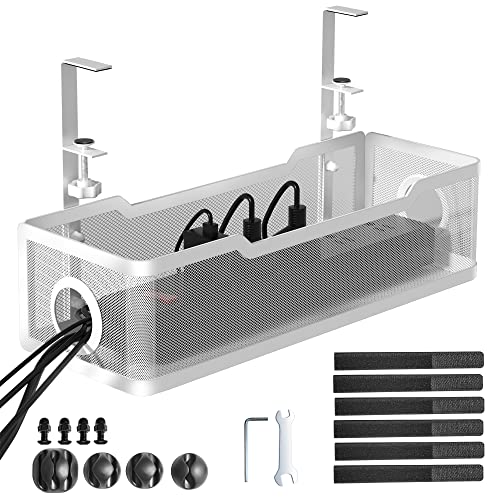
Cinati Under Desk Cable Management Tray, 13.4" Metal Cord Organizer, White | Fits Desk 0.4"-2.4" Thick, No Drill Cable Management Under Desk with Clamp for Standing Desk, Wire Management for Office Home
Check price on Amazon
Mzmaxy Cable Management, 25'' Cable Management Under Desk, Cable Tray | No Drill Under Desk Cable Management Tray, Cord Organizer with Clamp for Standing Desk, Desk Organizer for Home Office
Check price on Amazon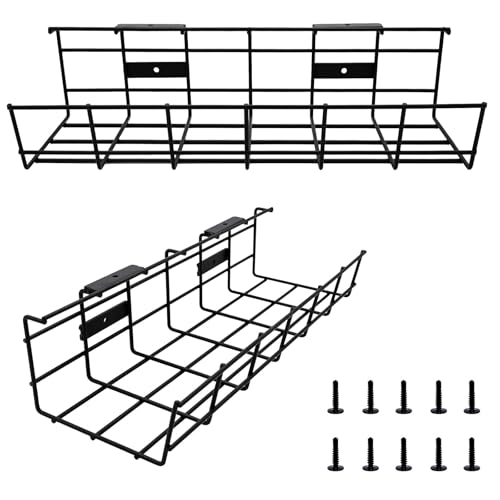
COYACOOL Under Desk Cable Management- 2 Pack Cord Organizer. Metal Wire Cable Management Tray for Office, Studio and Home. Super Sturdy Under Table Cable Management - Black Cable Organizer
Check price on Amazon
CableGenie [Made in the UK] 10-Pack Adjustable Elastic Adhesive Cable Clips, Wire Management Holder, Cord Organizer for Home Office, Under Desk, Behind TV, Phone Charger, Laptop, PC, HDMI, USB (Black)
Check price on Amazon
Univivi Under Desk Cable Management Tray, Cable Management, 32 inch, Black | Durable Steel Material, Under Desk Cable Tray with No-Drill C-Clamp and Screw Mount, Wire Management for Office/Home
Check price on Amazon
Cable Management, 25.3'' Under Desk Cable Management Tray No Drill | Metal Cable Organizer with Clamp for Wire Management, Cord Organizer for Home Office, Desk Accessories Organizer, Black
Check price on Amazon
Under Desk Cable Management Large, Cinati 16" Cable Management Box for Table Thickness up to 3", Wire Cord Organizer with Clamp No Drill, No Damage to Desk (White)
Check price on AmazonRelated Guides You'll Find Helpful
Nightstand Setup & Accessories
Complete your bedside with our full guide to accessories, from cable organizers to charging stations.
Explore Setup Guides →Nightstand Placement Guide
Learn how to position your nightstand for optimal cable routing and bedroom flow.
Read Placement Guide →Nightstand Care & Maintenance
Keep your nightstand and its cable management system in top condition with our care tips.
Maintenance Tips →