
Bed Side Tables with USB Ports: The Complete Buying Guide
Charge your phone, tablet, and e-reader right from your bedside. Learn how to choose the perfect USB-equipped nightstand for your bedroom.
SHOP TOP PICKSWhy Choose a Bedside Table with USB Ports?
In today's connected world, our smartphones, smartwatches, tablets, and e-readers have become essential bedside companions. Yet the traditional wall outlet often sits inconveniently behind the bed or across the room, forcing you to stretch cables across your nightstand or leave devices charging on the floor. A bed side table with USB ports solves this problem elegantly by integrating charging capability directly into your furniture.
These smart nightstands combine the storage and style of a traditional bedside table with built-in USB-A or USB-C ports, allowing you to plug in your devices without hunting for an adapter or sacrificing an entire wall outlet. Whether you're a tech enthusiast who wants to track sleep with a smartwatch, a reader who charges an e-reader nightly, or simply someone tired of crawling under the bed for a charging cable, a USB-equipped nightstand delivers everyday convenience.
Beyond convenience, these tables also reduce cable clutter. Instead of a tangle of cords draping across your bedside, a single cable connects your device to the table itself. This cleaner setup makes your bedroom feel more organized and visually calm — an important factor for rest and relaxation.
Quick Tip: If you're also considering a dedicated bedside lamp with charging capability, pair your USB nightstand with a touch bedside lamp with USB port to create a complete charging station on your nightstand surface.
How USB Ports on Nightstands Work
USB ports on bedside tables are typically powered by a small integrated power module that connects to a standard wall outlet via a hidden cord at the back of the furniture. This module converts AC power to the low-voltage DC power your devices need. Most nightstands offer either USB-A ports (the traditional rectangular connector) or USB-C ports (the newer oval connector), and some premium models include both.
USB-A vs. USB-C: Which Do You Need?
The type of port matters more than many buyers realize. USB-A ports remain the most common and work with older cables, but they generally charge at slower speeds. USB-C ports are increasingly standard on modern phones, tablets, and laptops, and they support faster charging and higher power delivery. If you've recently upgraded your phone, a USB-C port is likely your best bet.
Some nightstands include a combination of both port types, which offers the most flexibility. Others may include a standard AC outlet alongside USB ports, letting you plug in a lamp or laptop charger too. Consider what devices you charge nightly and choose a table with the port types that match your cables.
Charging Speed and Power Delivery
Not all USB ports are created equal. Basic ports may deliver just 5 watts (1A at 5V), which is fine for overnight charging but slow if you need a quick top-up. Fast-charging ports can deliver 18W, 30W, or even higher using Power Delivery (PD) or Quick Charge (QC) protocols. If you rely on your phone for morning alarms or need a fast charge before heading out, prioritize a nightstand with higher wattage and fast-charging support.
| Port Type | Typical Power | Best For |
|---|---|---|
| USB-A (standard) | 5W–12W | Overnight charging, older devices |
| USB-A (fast charge) | 18W–24W | Quick top-ups, Android phones |
| USB-C (standard) | 15W–30W | Modern phones, tablets |
| USB-C (Power Delivery) | 30W–65W+ | Laptops, fast charging, future-proofing |
If you want a versatile option that also handles smaller devices, consider a small end table with USB ports for tight spaces, or a modern end table with USB ports if your style leans contemporary.
Sizing and Placement Considerations
A USB nightstand still needs to fit your space and your bed height. The general rule is that the tabletop should sit level with or within 2 inches of your mattress top. This makes it comfortable to reach for a glass of water, a book, or your charging phone without awkward stretching.
Width matters too. A nightstand between 18 and 24 inches wide works for most beds, but if you have a king or queen bed with ample space on each side, you can go larger. For narrow gaps, a narrow side table with USB ports is an excellent solution that still provides charging convenience without crowding the bed.
Port placement is another detail worth checking. Ports located on the front face or top surface are easiest to access. Some models hide ports inside a drawer or on the back panel, which looks cleaner but can be awkward to reach. If you charge devices nightly, front-facing or top-mounted ports are far more practical.
Design Tip: For a cohesive bedroom look, consider pairing your USB nightstand with a matching set. A nightstand set of 2 ensures symmetry on both sides of the bed, and many sets now include USB-equipped models.
Materials, Styles, and Finishes
USB nightstands come in virtually every style and material, so you don't have to sacrifice aesthetics for function. Wood models — including oak, walnut, and mango — offer warmth and durability. Metal and glass designs bring a modern, minimalist feel. Rattan and woven options add texture and a relaxed, bohemian touch.
Finish choice affects both look and maintenance. White and light wood finishes brighten small bedrooms and pair well with neutral palettes. Black and dark walnut finishes add drama and work beautifully in contemporary or industrial settings. If you're building a coordinated bedroom, a black rattan nightstand set of 2 or a rustic white nightstand set of 2 can anchor your bedside styling while delivering USB convenience.
For those who prefer a mid-century aesthetic, a set of 2 mid-century nightstands with USB ports combines retro charm with modern utility. And if budget is a priority, there are plenty of cheap white nightstands set of 2 options that still include charging ports.
✅ Pros of USB Nightstands
- Eliminates need for wall adapters
- Reduces cable clutter
- Convenient overnight charging
- Available in every style and budget
- Some models include AC outlets too
❌ Cons to Consider
- Charging speed varies by model
- Ports can become outdated (USB-A vs C)
- Requires nearby wall outlet
- May add slight cost vs. standard nightstand
- Port placement isn't always ideal
Recommended Bed Side Tables with USB Ports
⚠️ AFFILIATE DISCLOSURE: This website contains affiliate links. As an affiliate Associate, we earn from qualifying purchases. If you make a purchase through these links, we may receive a small commission at no additional cost to you. Read our full affiliate policy.

HOOBRO Side Table with Charging Station, Small End Table with USB Port and Outlet, Nightstand with 2-Layer Storage Shelves for Small Spaces, Living Room, Bedroom, Stable Frame, Rustic Brown BF09UBZ01
Check price on Amazon
Yoobure Nightstand with Charging Station, Small Night Stand with Fabric Drawers and Storage Shelf for Bedrooms, Nightstands for Small Spaces, Bedside Table with USB Ports & Outlets Bed Side Table
Check price on Amazon
Yoobure End Table with Charging Station, Flip Top Side Table with USB Ports and Outlets, Sofa Couch Table Bedside Table for Living Room Bedroom, Narrow Nightstand with Storage Shelves for Small Space
Check price on Amazon
Vagusicc C Shaped End Table with Charging Station, Adjustable Height Side Table for Couch, Small Sofa Table with Storage Bag, Slide Under Sofa TV Tray Snack Arm Tables for Living Room, Bedroom, Brown
Check price on Amazon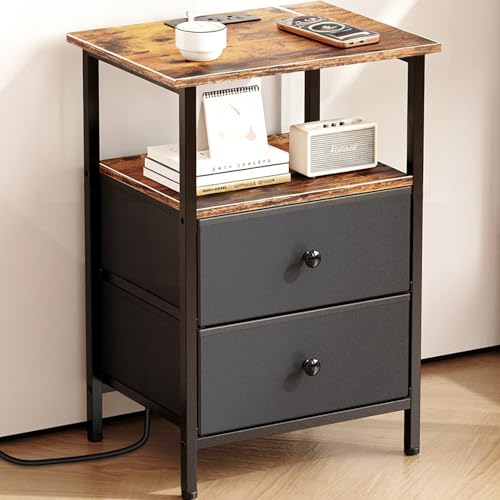
Smoproper Nightstand with Charging Station, Bedside End Table with 2 Fabric Drawers for Bedroom, Side Table with USB Ports and Outlets (Brown Black)
Check price on Amazon
Lazzanto Nightstand with Rear Charging Station, LED Light, 2 Drawers, Brown | Industrial Nightstand, 2 USB-A Ports & AC Outlets, Raised Back Guard, Fabric Storage Drawers, Bedside Table for Bedroom, Dorm
Check price on Amazon
MaxSmeo Side Table with Charging Station, 3-Tier Small End Table with USB Ports and Outlets, Modern Oval Night Stand Accent Table for Living Room, Bedroom, Rustic Brown
Check price on Amazon
Huuger Nightstand with Charging Station, Side Table with Fabric Drawers | End Table with Open Shelf, Bedside Table with USB Ports and Outlets, Night Stand for Bedroom, Rustic Brown and Black
Check price on AmazonBuying Checklist: What to Look For
Before you add a USB nightstand to your cart, run through this checklist to make sure you're getting the right model for your needs:
- Port type: Match the ports to your devices — USB-C for modern phones and tablets, USB-A for older gear.
- Charging speed: Look for at least 18W if you want fast charging; 5W is fine for overnight.
- Number of ports: Two or more ports let you charge multiple devices at once.
- Port placement: Front or top-facing ports are easiest to reach.
- Height: Tabletop should be level with or slightly below your mattress top.
- Width: Measure your space; 18–24 inches suits most beds, narrower for tight gaps.
- Material and finish: Choose something that complements your bedroom's existing style.
- Assembly: Some models require minimal assembly; check reviews for ease of setup.
- Warranty: A longer warranty often signals better build quality and electronics.
Budget Guide: Basic USB nightstands start around $60–$120. Mid-range models with faster charging and better materials run $120–$300. Premium solid wood or designer pieces with USB-C Power Delivery can reach $300–$800+.
Installation and Safety Tips
Installing a USB nightstand is usually straightforward, but a few precautions ensure safe, reliable operation. First, make sure the power cord reaches your wall outlet without straining. Avoid daisy-chaining extension cords, which can overheat. If the cord is too short, relocate the nightstand or use a properly rated surge protector.
Second, keep the power module away from moisture. Spills are common on nightstands — a glass of water knocked over at night can damage electronics. Choose a model with ports positioned away from the tabletop edge, or use coasters and spill-resistant cups.
Third, don't overload the ports. While most modules have built-in protection, charging too many high-draw devices simultaneously can cause overheating. Follow the manufacturer's recommended maximum load. Finally, if you have young children, consider a model with covered or recessed ports to prevent tampering.
For floating or wall-mounted options, always anchor securely into studs or use appropriate wall anchors. A poorly anchored floating nightstand can fall and damage devices or injure someone. If you're unsure, consult a professional installer.
Styling Your USB Nightstand
A USB nightstand doesn't have to look utilitarian. With a little styling, it can be a beautiful focal point in your bedroom. Start with a small lamp — a small bedside lamp with USB port doubles your charging capacity and adds warm light. A bedside touch lamp with USB port is another smart choice, offering easy on/off control in the dark.
Layer in a small tray for keys, glasses, and jewelry. Add a coaster for your water glass, a stack of two or three books, and perhaps a small plant or candle. Keep the surface from feeling cluttered — the goal is calm and functionality, not a display shelf.
If you have a larger nightstand, a small side table with cup holder insert or a C-shaped side table with storage can add extra utility. For a truly space-saving setup, consider a bedside table that goes over bed, which frees up floor space while keeping charging within reach.
Frequently Asked Questions
Do USB ports on nightstands charge as fast as wall chargers?
It depends on the model. Basic USB-A ports typically deliver 5W–12W, which is slower than a fast wall charger. Premium models with USB-C Power Delivery can match or exceed standard wall chargers, delivering 30W or more. Check the wattage before buying if fast charging matters to you.
Can I charge a laptop from a USB nightstand?
Only if the port supports USB-C Power Delivery at a high enough wattage (usually 45W–65W or more). Most standard USB ports won't charge a laptop effectively. If laptop charging is a priority, look for a model explicitly rated for it.
Are USB nightstands safe to leave plugged in overnight?
Yes, reputable models have built-in overcurrent, overvoltage, and thermal protection. However, avoid covering the power module, and don't overload the ports. If the module feels excessively hot, unplug it and contact the manufacturer.
What if my nightstand has USB-A but my phone uses USB-C?
You can use a USB-A to USB-C cable, which is widely available. However, charging may be slower than using a native USB-C port. If your phone supports fast charging, a USB-C port is preferable.
Can I replace or upgrade the USB module in my nightstand?
In most cases, no — the module is integrated into the furniture. If the ports fail, you may need to replace the entire nightstand or use an external adapter. Some higher-end models have replaceable modules, so check the product details if this is important to you.
Ready to Upgrade Your Bedside Setup?
A bed side table with USB ports is one of the simplest, most practical upgrades you can make to your bedroom. Browse our recommended picks above and find the perfect combination of style, storage, and charging convenience.
VIEW TOP PICKS